
Crisp County Civil Docket Searches
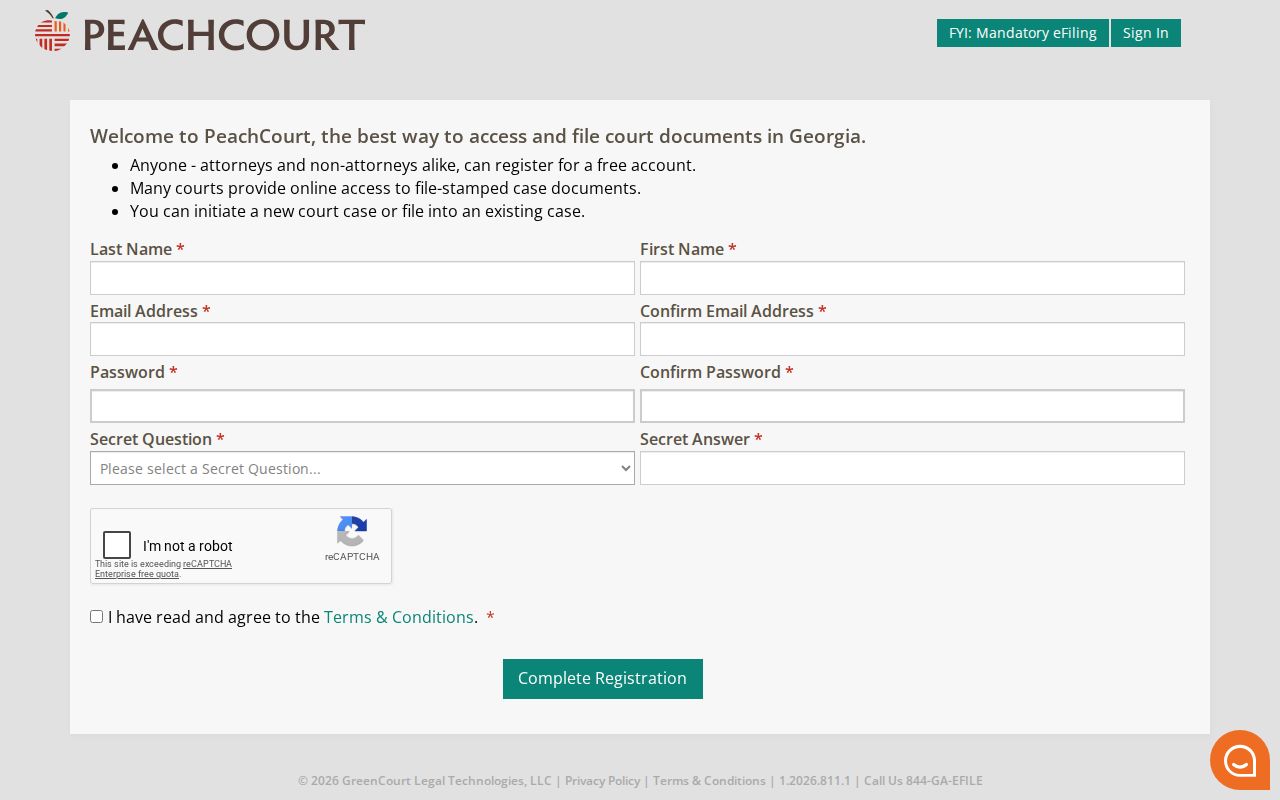
For most civil work in Crisp County, Superior Court is the place to look. Its civil docket covers broad civil matters, equity, divorce, family-law cases assigned to Superior, and property disputes. Contract and tort claims beyond limited-court jurisdiction appear there too. Authorized appeals or corrections from lower courts round it out. The Georgia Courts e-access directory points Crisp Superior users to PeachCourt, which requires an account. Once there, you can run a case number, party name, or filing search.
But start with the court and the case type. A civil claim within the Crisp Magistrate Court limit is not a Superior civil docket. Nor are a dispossessory file, an estate, a guardianship, a Juvenile dependency matter, or a city ordinance case. Civil words alone do not put them there. Keep the plaintiff or petitioner label, defendant or respondent label, county, date range, and exact case number together when you search.
- Choose Crisp Superior in the Georgia Courts e-access directory when the matter is a Superior civil case.
- Register or sign in to PeachCourt, then search by exact case number when available. Use party or filing search only when needed.
- Confirm the court, county, case type, party roles, filing date, and attorney fields before opening a result.
- Read service entries, motions, hearing settings, judgments, orders, costs, and satisfaction entries as separate parts of the docket.
- Ask the Clerk for a certified copy, a public or redacted document, a missing older file, or the correct lower-court route.
If the search does not fit the case, call the office that owns it. That means Magistrate, Probate, Juvenile, or the municipal clerk, depending on the file. A blank screen on PeachCourt does not mean a lower-court record is missing.
Crisp County Civil Filing Route
Georgia Courts lists Crisp Superior as mandatory on PeachCourt for e-filing in its e-file directory. The e-access directory puts the court's online records with the same provider. So PeachCourt is the main digital route for Superior civil filing and case lookup alike. It is not, however, a complete public index for every Crisp court. A convenience or access charge may appear at checkout. Check the exact local pricing before you pay.
Across the provider, document descriptions include complaints, answers, motions, briefs, agreements, affidavits, exhibits, notices, orders, and petitions. Transcripts, dismissals, decrees, and verifications appear as well. Any single Crisp case may hold fewer documents than that. Imaging can lag. A seal, a redaction, or a restricted category can hide a filing. An absent image is not proof that no paper was filed.
The PeachCourt registration page lists the account fields you will need. For a paper filing, a pro se procedure, or a certified copy, ask the Clerk of Superior and Juvenile Courts for current local instruction. The online account is no substitute for a clerk's answer. And it is not legal advice.
The PeachCourt registration source documents the account gate that stands between a Crisp Superior searcher and the provider.
Civil Dockets: What They Show
A civil docket can track a complaint or petition, service, answer, counterclaim, motion, hearing, order, judgment, appeal, and satisfaction entry. Party labels show who filed and who responded, while the docket date tells you when an event entered the court record. Learn what each entry is. A complaint states a claim. An answer may admit, deny, or assert defenses. A motion asks for relief. Only an entered order or judgment states the court's ruling.
| Case number and type | Use the exact provider or clerk number and note Superior civil, Magistrate, Probate, Juvenile, or municipal routing. |
|---|---|
| Party roles | Capture plaintiff or petitioner, defendant or respondent, and attorney-of-record fields only as publicly shown. |
| Filing and service | Separate the date a pleading was filed from the date and status of service or return. |
| Motions and decisions | Record the motion title, decision date, and entered order. A motion’s request is not the ruling. |
| Hearings and trials | Note the setting type, date, time, courtroom, judge, and whether a later reset or continuance changed it. |
| Judgment and costs | Read the complete judgment, dismissal, satisfaction, cost, or appeal entry rather than relying on a short status label. |
Protected financial, medical, minor, or identifier data may be redacted from a public copy. If a case result matters, save the case number, the source, the entry date, and the document status. Keep the limits in mind: a docket records procedure and rulings, not every factual claim in the case.
Crisp County Civil Search Fields
A good search note records the fields that separate a real case from a similar result. PeachCourt's help describes county and court selection, exact case-number search, party-name search, and filing search. The civil inventory below lists docket fields worth checking once a result opens. The provider may show some fields in a different order, or not expose them at all for a given case.
| Field | What to capture | Why it matters |
|---|---|---|
| Court and county | Crisp and the named court class | Prevents a city, Magistrate, Probate, or federal record from being treated as Superior. |
| Case number and type | Exact number and civil category | Lets the clerk or provider locate the same file later. |
| Party role | Plaintiff, petitioner, defendant, or respondent | Separates people with similar names without adding unnecessary personal detail. |
| Filing and service | Dates, return, and status | Shows procedural progress, since filed does not mean served. |
| Order or judgment | Title, entry date, and public link status | Distinguishes a court ruling from a requested motion or allegation. |
With an exact case number, use it first. It is the best key to the right court docket. When a name search returns several cases, confirm the court, county, filing date, party role, and case type before opening a document, and save the result's source URL and the date checked.
What Cases Fill the Civil Docket
Civil records in Crisp County are split by jurisdiction. Superior Court takes broad civil matters, equity, divorce, family matters assigned there, injunctions, property disputes, and claims beyond limited-court jurisdiction. Magistrate Court handles civil claims up to $15,000 plus dispossessory matters under the Georgia court structure. Probate handles estates and guardianships. Juvenile dependency and CHINS proceedings follow separate access rules.
- Superior civil complaints, contract and tort matters, property disputes, equity, divorce, and family-law filings assigned to Superior.
- Magistrate civil claims at or below the published $15,000 limit and dispossessory matters.
- Probate estates, wills, guardianships, conservatorships, and related orders.
- Juvenile dependency and CHINS proceedings, which are civil or protective in character but access-limited.
- Municipal ordinance matters kept by the city court that issued the case.
There is no single generic "Crisp civil docket" holding Probate, Magistrate, Juvenile, and municipal files together. The court name sets your first request route and the rules that govern public access to the court records.
Crisp County Magistrate Civil Boundary
Magistrate Court handles its own civil work, not a cut-rate version of Superior Court. Under Georgia Courts, its civil claims run up to $15,000. It also covers dispossessory actions and a few other limited processes. The Crisp Magistrate office sits at 510 7th Street North, Suite 105, Cordele. It answers at 229-271-4728. The court posts no public docket portal of its own.
Call before you assume anything about a Magistrate file. Ask the clerk whether a public index, docket sheet, copies, or a name search by phone is offered. Ask too what a request by mail would cost. Fees, terminals, and turnaround times all sit with the office itself. One more caution: a case missing from PeachCourt does not mean no Magistrate claim or dispossessory exists.
Probate Court is a different door entirely. Estates, guardianships, marriage licenses, weapons-carry licenses, and certain traffic citations live there. They are not in a Superior civil search. Confirm the right office before you send anything.
Hearings on the Civil Docket
A civil setting on a Crisp County docket might be a motion hearing, a status conference, a calendar call, or the trial itself. Write down the date, the start time, the courtroom, the judge, the event label, and the case number. Add where you saw it and when. A setting is only a plan. It proves neither that the hearing happened nor that any motion won.
The Cordele Circuit calls its calendars general guides. It tells readers to confirm dates and times with the local clerk. Its 2024 facilities calendar lists civil and CS hearings, civil trials, PAC/CS hearings, administrative days, and room labels. Don't confuse a commission meeting calendar with a court calendar. And remember that a later order, reset, continuance, emergency closure, or summons can override an older listing.
For a full verification routine, use the Crisp County court schedule. Then compare the setting against the docket entry. Compare it against the newest notice or order in the civil case as well.
Crisp County Civil Calendar Distinction
The Crisp facilities calendar earns its keep by naming local terms like Civil/CS Hear, CR1, and CR2. Courthouse and jury-room labels come with it too. But it is an operations plan, not a full public case list. A room blocked off for civil work tells you nothing about which case is set there. A livestream status tells you nothing about whether a hearing actually occurred.
The circuit's online calendar is not final on its own either. Verify any civil date with the clerk of the county involved. Then check it against the summons or any later order. If your source is stale, note when you checked it and ask whether the setting was continued, reset, or canceled.
The gap matters most when a civil docket shows both a scheduled event and a later entry. Keep both dates. The setting shows what was planned. The docket entry or order shows what the court actually recorded.
Who Can See Civil Dockets
Several rules shape who sees what in a civil court file. Georgia's Open Records Act leads the list, alongside court-file rules, protective orders, and redaction practice. The Georgia Courts e-access directory lists providers. It promises nothing, though. Not every file is online, complete, free, or open without an account. For a Superior case, PeachCourt may display a docket or a document link. For Magistrate, Probate, Juvenile, or municipal matters, go straight to the office that holds the case.
Access points:
Georgia Open Records Act, O.C.G.A. §§50-18-70 through 50-18-75, supplies the public-record framework for records held by qualifying custodians.
Uniform Superior Court Rule 21 governs limits on access to Superior court files and requires a basis for a limiting order.
Rule 21.6 and O.C.G.A. §9-11-7.1 address protected identifiers and redacted public versions.
The Attorney General FAQ explains response timing, exemptions, costs, and release of non-exempt material.
Put specifics in any written request: the custodian, the case number, the record type, the date range, the delivery format, and whether you want certification. If something is withheld, ask for the legal basis and for the non-exempt portions. A sealing order controls what it controls, no matter how a request is labeled.
Crisp County Civil Access Products
Different civil needs call for different products. A plain online image suits personal research. Another court, an agency, an appeal, an estate, or an official filing may require a certified copy. An exemplified copy can add another authentication step. A transcript is a word-for-word record, and it is not a docket entry, a downloaded document, a livestream, or courtroom video.
The statewide Superior Court cost schedule effective July 1, 2024 lists a $218 general civil filing benchmark before service or other case-specific charges, plus general copy and certification benchmarks. Those figures are not a guaranteed Crisp receipt total. The Clerk's office publishes no complete local online schedule for every docket sheet, certified copy, transcript, or search product.
Crisp Clerk Records Route
Clerk of Superior and Juvenile Courts
510 7th Street North, Cordele, GA 31015
229-271-4726
8:30 a.m. to 5 p.m., Monday through Friday
Before you pay or drive anywhere, ask whether the record is public, redacted, sealed, imaged, certified, or held by another court. Naming the exact page or order beats requesting an entire person-based file.